Recording supplier invoices is still a critical process for many organisations. Even though document digitisation has come a long way, teams still spend time receiving documents, sorting them, checking the information and keying the data into the ERP by hand.
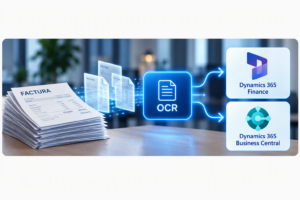
At Revertis we have developed an intelligent OCR solution that automates the capture, reading, validation and integration of invoices with Dynamics 365 BC or Finance.
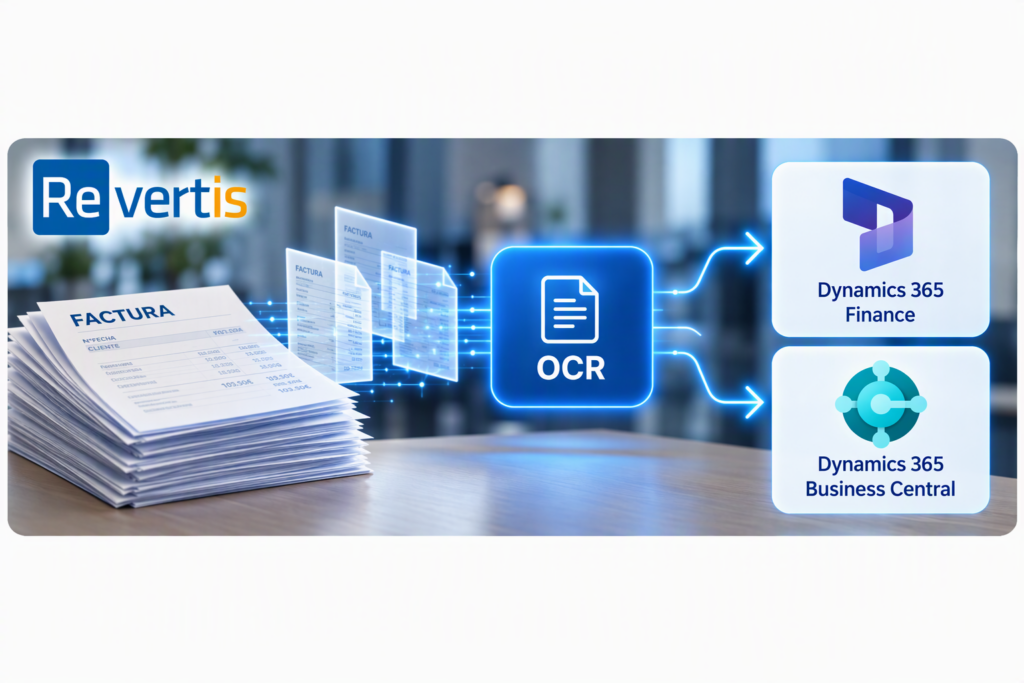
The project turns a traditional process, built on several tools and manual steps, into a cloud workflow that runs entirely within the Microsoft environment, with no extra licences or third-party tools:
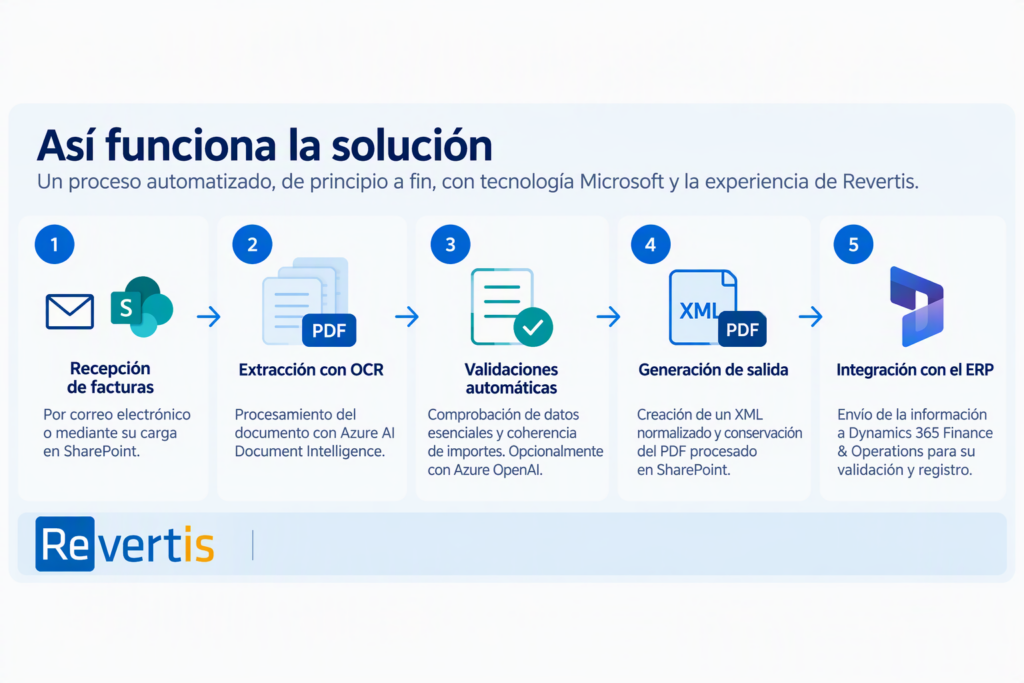
Email or SharePoint → Power Automate → Azure Function → Azure AI Document Intelligence → XML and PDF → Dynamics 365 BC or Finance
The goal is not just to digitise documents. The solution turns invoices into structured data, applies automatic checks and sends the data to the ERP, keeping the business process intact and making sure every invoice follows the same process and is stored in the same way.
What is intelligent invoice OCR?
OCR (optical character recognition) turns a PDF or an image into text. Intelligent invoice OCR goes one step further: it uses AI models to understand what each piece of data is (supplier, tax ID, tax bases, taxes or line items) even when every supplier uses a different layout, and delivers it in a structured format the ERP can work with, with no manual typing.
Automatic capture of supplier invoices by email or SharePoint
Invoices can enter the process through two channels:
- Automatic reception of the message in a dedicated mailbox, with automated extraction of the invoice PDF/XML file or files.
- Manual or automated upload of the document to an inbound SharePoint folder.
From that moment, our system detects the new invoice, checks that the document has the expected format and starts processing it automatically.
Users do not need to handle the document manually, save it to a local folder or run any extra process to start reading the invoice.
Data extraction with intelligent OCR: Azure AI Document Intelligence
The invoice is processed with Azure AI Document Intelligence, which analyses the PDF and extracts the information needed to continue the accounts payable workflow.
The main data it can identify includes:
- Supplier and tax ID (NIF or CIF).
- Invoice number.
- Issue date.
- Tax base.
- Taxes, including withholding tax (IRPF), reverse charge (ISP), etc.
- Total amount.
- Currency.
- References to delivery notes, purchase orders or others, as well as line details when available.
- Quantities, prices, discounts and amounts.
The extracted information is converted into a standard format that makes integration with the ERP easier.
Automatic validation of invoice data
The process goes beyond reading the fields visible on the document. The solution runs several checks to verify the integrity and consistency of the extracted information.
Among other things, it can verify:
- That the supplier or its tax ID exists.
- That the invoice number and date are present.
- That the total amount is present.
- That tax bases, taxes and total add up.
- That subtotals and amounts are consistent.
- That all the data needed to continue the process is available.
In some scenarios, the solution can also include an advanced validator powered by Azure OpenAI to strengthen the review of additional details, such as references, recipients or any other information picked up during document recognition.
Standardised output: PDF and XML ready for the ERP
Once the invoice has been processed, the solution generates:
- The original or processed PDF.
- A standardised XML file with the extracted information.
- The processing status.
- The validation results.
- The information required for integration with Dynamics 365 BC or Finance.
SharePoint acts as the inbound and outbound document repository, clearly separating received documents, processed documents and those that need review.
This approach provides traceability throughout the invoice lifecycle and makes it easy to look up the documentation later, which also stays linked directly in the Dynamics 365 ERP, just as in our electronic signature integration with Dynamics 365.
Invoice review from Dynamics 365 Business Central or Finance
One of the most important aspects of the project is that users do not need to work with the OCR engine directly.
Functional review is done from Dynamics 365 BC or Finance, through an inbox of received invoices and a form built into the Dynamics solution, where users can:
- View the recognised information.
- Display the PDF document.
- Identify errors or warnings.
- Correct the necessary fields.
- Run the validations again.
- Continue with posting and managing the invoice.
Invoices are colour-coded according to the processing result:
- Green: all the required information is complete.
- Orange: there are warnings or data that need to be reviewed.
- Red: not enough information could be identified, or there is an error that prevents the process from continuing.
This way, the accounts team can focus on the invoices that actually need attention.
Business process continuity
The implementation does not require a complete redesign of the existing accounts payable workflow.
The new architecture modernises document capture while keeping the later invoice management stages inside the ERP:
- Document reception.
- Automatic OCR reading.
- PDF and XML generation.
- Data validation.
- Correction of any issues.
- Matching with purchase orders or agreements.
- Approval.
- Posting.
- Payment preparation.
The technology used to receive and process invoices is modernised without unnecessarily changing the functional logic the organisation already uses.
100% Microsoft architecture: Power Automate, Azure and SharePoint
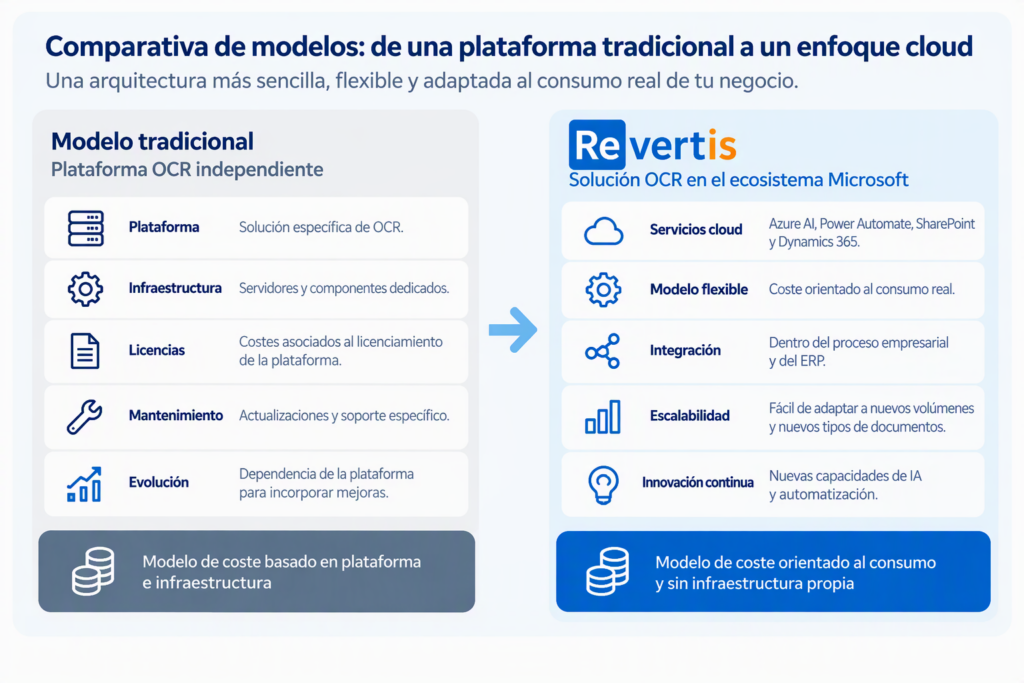
The new solution moves from a traditional model, based on a standalone OCR platform, servers and specific components, to an architecture built into the Microsoft ecosystem.
It uses:
- Power Automate to orchestrate the process.
- Azure Functions to run the integration logic.
- Azure AI Document Intelligence for document recognition.
- Azure OpenAI, optionally, to strengthen certain checks.
- SharePoint as the document repository.
- Dynamics 365 BC or Finance for validation and process continuity.
- Application Insights for technical monitoring and processing logs.
All these tools are already included in the customer’s own Microsoft 365 and Dynamics 365 subscriptions, so nothing else needs to be added. The system only has to be orchestrated and activated in the customer’s own environment (tenant), so the customer always owns and controls its installation, while Microsoft handles management, availability, security and backup of the whole system, at no extra cost to the current solution.
Consumption-based costs vs a traditional OCR platform
The change is not only technological. It also enables a different cost model.
In a traditional model, costs may depend on:
- Licences for a specific OCR platform.
- Dedicated infrastructure.
- Servers and middleware components.
- Platform maintenance.
- Updates and specialised support.
- Reliance on the vendor to add new features.
The new architecture uses cloud services and Microsoft components that are already available. This shifts a larger share of the cost to actual usage and consumption of the services, and reduces reliance on in-house infrastructure dedicated solely to OCR processing.
The final cost will depend on the volume of invoices, the number of pages processed, the consumption of the Azure services used and the specific integration needs. That is why savings are present in every project, simply by comparing the total cost of ownership of both architectures.
Benefits of automating invoices with OCR
The solution delivers operational, technological and financial benefits:
- Automated invoice capture.
- Less manual data entry.
- Automatic processing from email or SharePoint.
- A consistent process for recording and handling invoices.
- Functional validation directly from Dynamics 365 BC or Finance.
- Visual identification of errors and warnings.
- Greater traceability of the PDF, the XML and the corrections made.
- Less reliance on servers and middleware.
- Architecture based on Microsoft technologies.
- Easier to move the solution between environments.
- Ability to extend it to new document types.
- A more flexible, consumption-based cost model.
More than reading documents: OCR inside the process
OCR is no longer an isolated tool: it becomes an integrated part of the business process.
The technology can identify the information on an invoice. However, the real value comes when that data is validated, tracked and sent automatically to the ERP to continue the accounts payable workflow.
At Revertis we design document automation solutions that combine artificial intelligence, Microsoft Azure, Power Platform, SharePoint and Dynamics 365, adapting the architecture to each organisation’s real process.
Is your company still entering invoices into the ERP by hand?
At Revertis we can help you analyse your current process, identify automation opportunities and design an intelligent OCR solution integrated with your ERP.
Contact us and find out how to automate the whole process, from receiving the invoice to validating and posting it.